Online & Mobile Banking
Bank from anywhere
Stay on top of your money with intuitive online and mobile banking. Check balances, transfer funds, deposit checks, and more.



To add the FICO® Score feature, go to Financial Wellness in Online Banking and click FICO® Score. Follow the on-screen prompts to enroll.
Once you’ve enrolled, you’ll get quarterly updates through that same link: Financial Wellness > FICO® Score, or simply FICO® Score from the Mobile Banking menu.
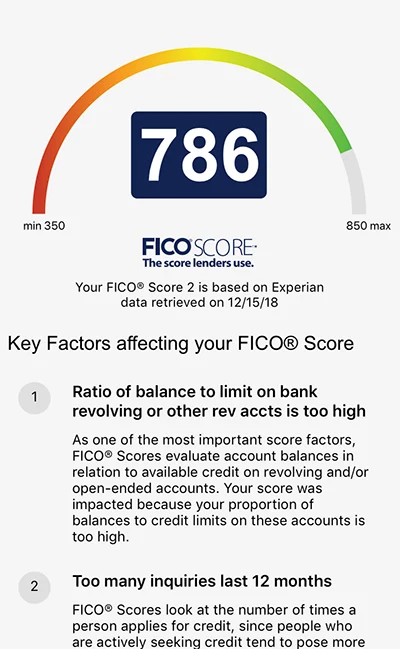
Clicking on the FICO® Score feature opens a page that shows your FICO® Score, the date of the pull that generated the FICO® Score, and the top two factors that influenced the FICO® Score. Note: checking your score will not impact it.
The first time you open this feature, you will need to review a disclosure and opt-in to the program before you will be able to view your FICO® Score. You will be able to opt-out at any time, with the option to opt-in again in the future.
(Image is a sample from Mobile Banking, but information is the same as you would see in Online Banking)

Stay on top of your money with intuitive online and mobile banking. Check balances, transfer funds, deposit checks, and more.

Get the card that cuts out the fees while giving you rewards, overdraft protection, and lower rates.
As a local credit union, we measure our success one member at a time. We want to get to know you and help you achieve your goals. Come into a branch or call us today. Our people are happy to serve you.

(415) 674-4800
(888) 499-FIRE (3473)
Mon-Fri 7:00 AM – 7:00 PM
Sat 9:00AM - 5:00PM

Branch hours
Mon-Fri 9:30AM – 5:30PM
Saturday 10:00AM – 2:00PM
FICO is a registered trademark of Fair Isaac Corporation in the United States and other countries. SF Fire Credit Union and Fair Isaac are not credit repair organizations as defined under federal or state law, including the Credit Repair Organizations Act. SF Fire Credit Union and Fair Isaac do not provide “credit repair” services or advice or assistance regarding “rebuilding” or “improving” your credit record, credit history, or credit rating.
